Article ID Code:GK-SPE-02
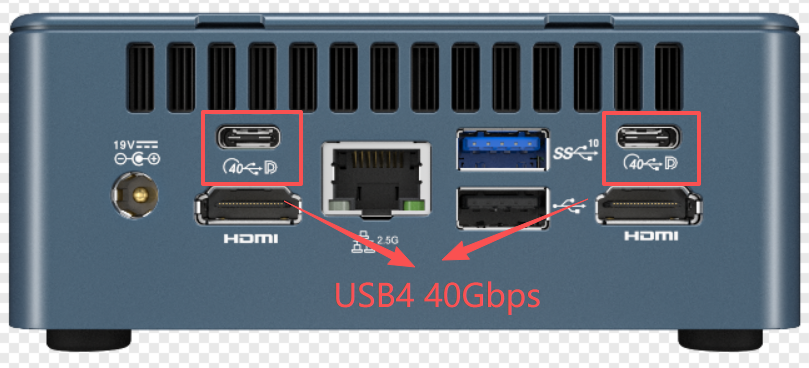
After the device is updated with this firmware, it can stably recognize iPhones when connected via a data cable to the USB4 port, while also being compatible with most Android models. The recognition rate for previously unrecognizable USB-C devices has also been significantly improved. The entire update process can be completed in just a few minutes.
Tip:This firmware update only supports GEEKOM IT12, IT13, GT12 Pro, GT13 Pro, XT12 Pro, and XT13 Pro.
Tool File Download
Download link:USB4 FW_F0310
Video Guide
USB4 Firmware Flashing Tutorial (It is recommended to watch in full-screen mode for optimal clarity).
Text Guide
1.GEEKOM MiniPC has two USB4 ports, coded as 80 and 84 respectively, so you need to update twice. After the update is complete, select the other port and repeat the steps below.
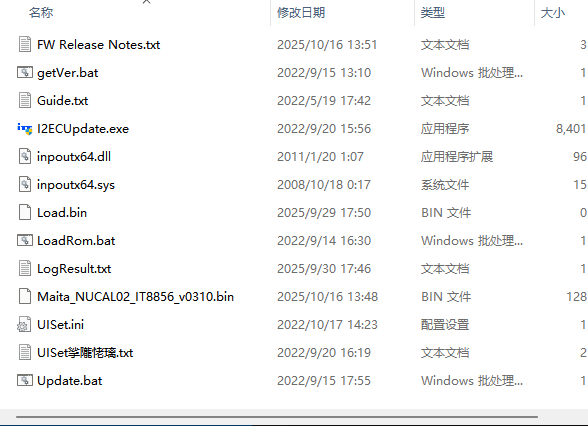
2. Update file and program introduction
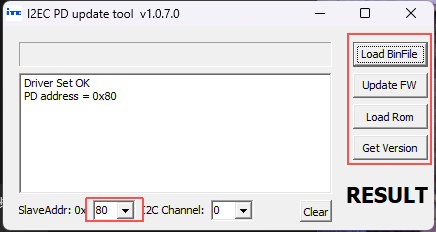
- GEEKOM MiniPC has two USB4 ports, coded as 80 and 84 respectively, so you need to update twice. After the update is complete, select the other port and repeat the steps below.
- Click GetVersion to get the current USB4 firmware version——USB4 old version is usually 0309
- Click Load BinFile, select the new firmware file -- Maita NUCAL02 IT8856 Test VF0310
- Click Update FW to start flashing the USB4 firmware
- After the update is complete, click GetVersion again to retrieve the current USB4 firmware version, and confirm if it is F0310. If so, it indicates that the update was successful.
- After both interfaces have been updated, shut down the computer, unplug it, and restart to complete the process thoroughly.
Thank you for watching. If there are any mistakes, your corrections are welcome.
Comments
0 comments
Article is closed for comments.